





Odoo Upgrade Service
Versions
Odoo releases a new version every year
Upgrade
Upgrading allows you to enjoy the latest features and functionality
Hosting
The Upgrade process depends on your hosting type
Option 1: using the command line
Use the below command* on the machine where your database is hosted:
python <(curl -s https://upgrade.odoo.com/upgrade) test -d <your db name> -t <target version>
The following command can be used to show the general help and the main commands:
python <(curl -s https://upgrade.odoo.com/upgrade) --help
To show help for a specific command (for example, test):
python <(curl -s https://upgrade.odoo.com/upgrade) <command> --help
* For production upgrades, use the command production instead of test.
Advantages of the command line
-
Faster upload and download.
-
Faster dump and restore thanks to the parallelization (see --jobs in the Postgresql documentation).
-
See the logs in real-time, to have an overview of the progress.
-
Resume-able in case of interruption.
Process via upload form
- Testing Stage
-
Dump your database and request an upgrade by filling in this form (select purpose "Testing").
-
After a successful upgrade*, you will be sent an email with a link to the upgraded dump. Download it and restore it.
-
Thoroughly test all processes and workflows and report any discrepancies via the helpdesk.
- Production Stage
-
Once the testing has been completed and you didn't detect any inconsistencies, you can proceed to upgrade your database on production within 3 days after the test upgrade.
-
Dump your database and request an upgrade by filling in this form (select purpose "Production").
-
After a successful upgrade*, you will be sent an email with a link to the upgraded dump. Download it and restore it, then reconfigure Odoo to use the newly restored, upgraded database.
Find detailed upgrade documentation and the FAQ here.
Option 1: using Odoo.SH upgrade tool
For full details please check the online docs for Odoo.sh upgrades.
-
Go to your Odoo.sh project: odoo.sh
-
Click on the branch on which you want the upgraded database - a staging branch for testing purposes and the master branch for the production upgrade.
-
Find the UPGRADE tab in the menu bar*, select the version you would like to upgrade to and click on Test Upgrade (it will read Start Upgrade on the master branch).
Note: For a test upgrade (staging branch) this will always trigger an upgrade of the latest daily production back-up (it will not consider manual back-ups).
-
Once the upgrade of the database is finished, it will prompt you to push a commit** in order to incorporate any customisations you might have (push an empty commit if you don't have any). This will trigger a restore/update of the build and make the database accessible
Once you are satisfied with the results of your tests, follow the same steps for the production upgrade on your master branch.
Advantages of Odoo.SH upgrade tool
-
Automatic upload and restore of DB dumps sent to the upgrade platform.
-
Faster dump and restore of production upgrades.
-
Automatically triggered custom modules upgrade.
-
Strict checks and report of errors from the logs.
Process via upload form
- Testing Stage
-
Download a backup dump from odoo.sh (purpose "Exact dump", without filestore).
-
Request an upgrade by filling in this form (select purpose "Testing").
-
After a successful upgrade*, you will be sent an email with a link to the upgraded dump. Download it and restore it onto a staging branch (fork of your production branch).
-
Thoroughly test all processes and workflows and report any discrepancies via the helpdesk.
- Production Stage
-
Once the testing has been completed and you didn't detect any inconsistencies, you can proceed to upgrade your database on production branch within 3 days after the test upgrade.
-
Download a backup dump from odoo.sh (purpose "Exact dump", without filestore).
-
Request an upgrade by filling in this form (select purpose "Production").
-
After a successful upgrade*, you will be sent an email with a link to the upgraded dump. Download it and restore it onto your production branch.
Find detailed documentation and the FAQ here.
Process
-
Go to your database manager:
odoo.com/web/login -
Click on your profile icon and select "My Databases"
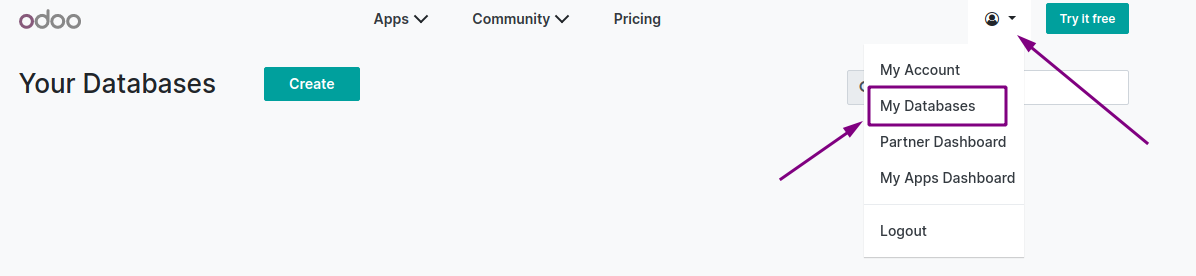
-
Click on the action settings icon next to your main database where you will find the "Upgrade" option (test or production)
In the pop-up message that will appear, you will be given the option to choose:
- a test upgrade request, which will give you an upgraded copy of your database for testing OR
- a production upgrade request, that will upgrade your live database to the new version.
-
This will trigger the automated upgrade process which upon successful completion will send you an email with a link to either your upgraded test database or to confirm that your upgraded production database is ready (on the same web address).